
OVERVIEW

An active SFG20 licence shows your organisation has access to the latest version of the industry standard for building maintenance specification, helping reinforce your reputation for compliance and professionalism. Promoting your licence with an SFG20 Digital Badge enhances credibility and performance in tenders and audits.

Become a trusted SFG20 partner

Strengthen your position in the industry by getting licenced and displaying your Digital Badge, helping you gain competitive advantage and win client confidence.
Get licenced
1
Get licensed

An SFG20 licence confirms your organisation’s authorised access to the industry standard for building maintenance specification within Facilities-iQ, ensuring you’re referencing the most current guidance available.

Building owners, clients, and facilities managers can verify a company’s licence by visiting the SFG20 Member List.

Claim digital badge-1
2
Claim your Digital Badge New

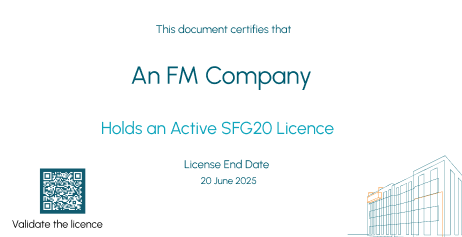
Once licensed, your organisation can display an official SFG20 Digital Badge—a live, tamper-proof credential with a QR code and blockchain ID, that confirms your active licence and updates automatically on renewal.

You can showcase your badge on your website, email signature, and LinkedIn to build visibility, strengthen credibility, and give clients instant confidence in your status.

Benefits:

  • Display proof of your active SFG20 licence
  • Enhance credibility in tenders, proposals, and audits
  • Gain a visible trust signal clients can instantly verify
SFG20 DIGITAL BADGE SERIES

Useful guides & resources

what is the SFG20 badge image 168
What is the SFG20 Digital Badge?

In this video you will learn about the Digital Badge and how it can help you become more successful with clients and tenders.

Watch now
How to claim your SFG20 badge image 168
How to claim your SFG20 Digital Badge

This video will walk you through the process of claiming your Digital Badge, as well as how you can download and use your Digital Badge in a range of formats.

Watch now
How to check for an active sfg20 license image 168
How to check if your maintenance contractor has an active SFG20 licence

Discover if your maintenance contractor upholds the industry standard with SFG20.

Watch now

FAQS

Frequently asked questions

Licencing
What is an SFG20 licence?

An SFG20 licence confirms your organisation’s authorised access to the industry standard for building maintenance specification within Facilities-iQ, ensuring you’re referencing the most current guidance available.

How do I become licenced?

Book a demo and our team will guide you through setup and licence activation.

Does holding a licence mean my company is compliant?

No. It confirms access to the latest version of the SFG20 standard. Adherence remains your responsibility.


FAQS

Frequently asked questions

Verification
How do I verify if a contractor is an SFG20 member?

To check if a contractor holds an active SFG20 licence:

  1. Visit the SFG20 Member List.
  2. Search for the contractor’s name.
  3. Open their profile to view their membership page.
  4. Select ‘Verify Credential’ to confirm their licence.
What happens if a company’s licence expires?

When a licence expires, the company is automatically removed from the Member List and any live SFG20 Digital Badge is deactivated.


FAQS

Frequently asked questions

Digital Badges
What is the SFG20 Digital Badge?

The SFG20 Digital Badge is a live, tamper-proof credential for licensed SFG20 members. It confirms that a company holds an active licence with access to the latest SFG20 maintenance standards.

Why should I want the SFG20 Digital Badge?

The badge demonstrates your commitment to compliance and safety, giving you:

  • A competitive edge in tenders and client negotiations
  • Instant credibility with clients and stakeholders
  • An easy way to promote your expertise on your website, email signature, and social media
Where can I see an example of a SFG20 Digital Badge?

Visit the Sample Membership Badge page to see how the badge displays company details, licence dates, and a QR code for verification.

How do I get the SFG20 Digital Badge?

You’ll receive your badge once your SFG20 licence is activated. Book a demo to learn more about membership and setup instructions.

What does the SFG20 Digital Badge include?

It displays your company name, licence start and expiry dates, and a QR code that links to your public membership page.

How does the verification process work?

Clients can scan the badge’s QR code to view your public membership page and confirm your licence details and authenticity via blockchain ID.

Can the SFG20 Digital Badge help me win tenders?

Yes. It provides visible proof of your active licence, helping demonstrate credibility and access to up-to-date maintenance standards during evaluations and audits.